· 3 min read
Swnb

最近遇到一个很奇怪的问题

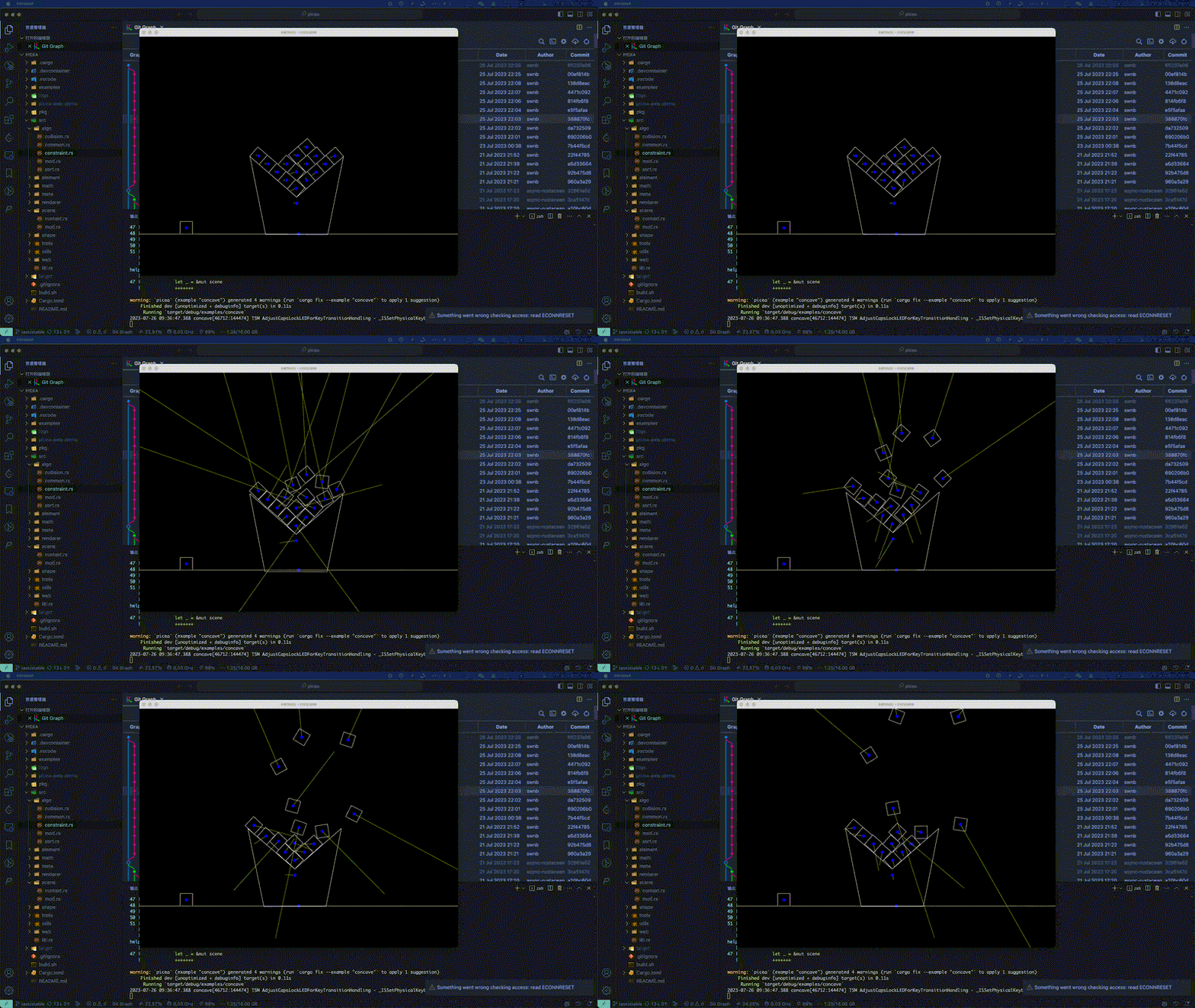
我的物理引擎,总是在稳定下来之后一段时间内发生爆炸,效果如下
简单梳理下我的物理引擎的处理流程

  1. 通过GJK算法分析是否碰撞
  2. 通过EPA算法得到碰撞法线和碰撞深度
  3. 通过v_clip算法得到足够多的碰撞点对
  4. 约束

经过排查发现,是EPA 的过程出错了(EPA 算法解析),如果一个Minkowski边已经在原点上了, 那么理论上是无法expand

所以一开始想到的解决方案是,判断 Minkowski 边是否在原点上,或者非常靠近原点,但是无论怎么调整参数,都不行,原因是: 根本无法精准的判定Minkowski 边是否在原点上,计算偏差总是存在的

  1. 如果误判在原点上,那么最终结果肯定是错的
  2. 如果误判不在原点上,继续扩展,因为该边足够靠近原点,得到的指向原点的向量的方向很可能是相反的,该算法就会继续扩展,得到错误的结果

但是理性下来分析,为什么是稳定了一段时间后才会出现这个问题呢?

因为随着物理引擎的约束(持续冲量),系统会不断的逼近稳定的状态,一开始系统内物体之间的碰撞有很大的碰撞深度, 随着系统的持续约束,物体之间的碰撞深度不断的减少,最后逼近 0。这个时候,Minkowski最靠近原点的边就会落在原点上,然后导致计算的偏差, 要想解决这个问题,可以让物体之前保持一个最小的碰撞深度,比如 0.001, 这样就不会出现Minkowski最靠近原点的边落在原点上的情况了

代码如下


_10
let permeate = contact_info.depth - constraint_parameters.max_allow_permeate;

最后的效果如下(不考虑摩擦力)
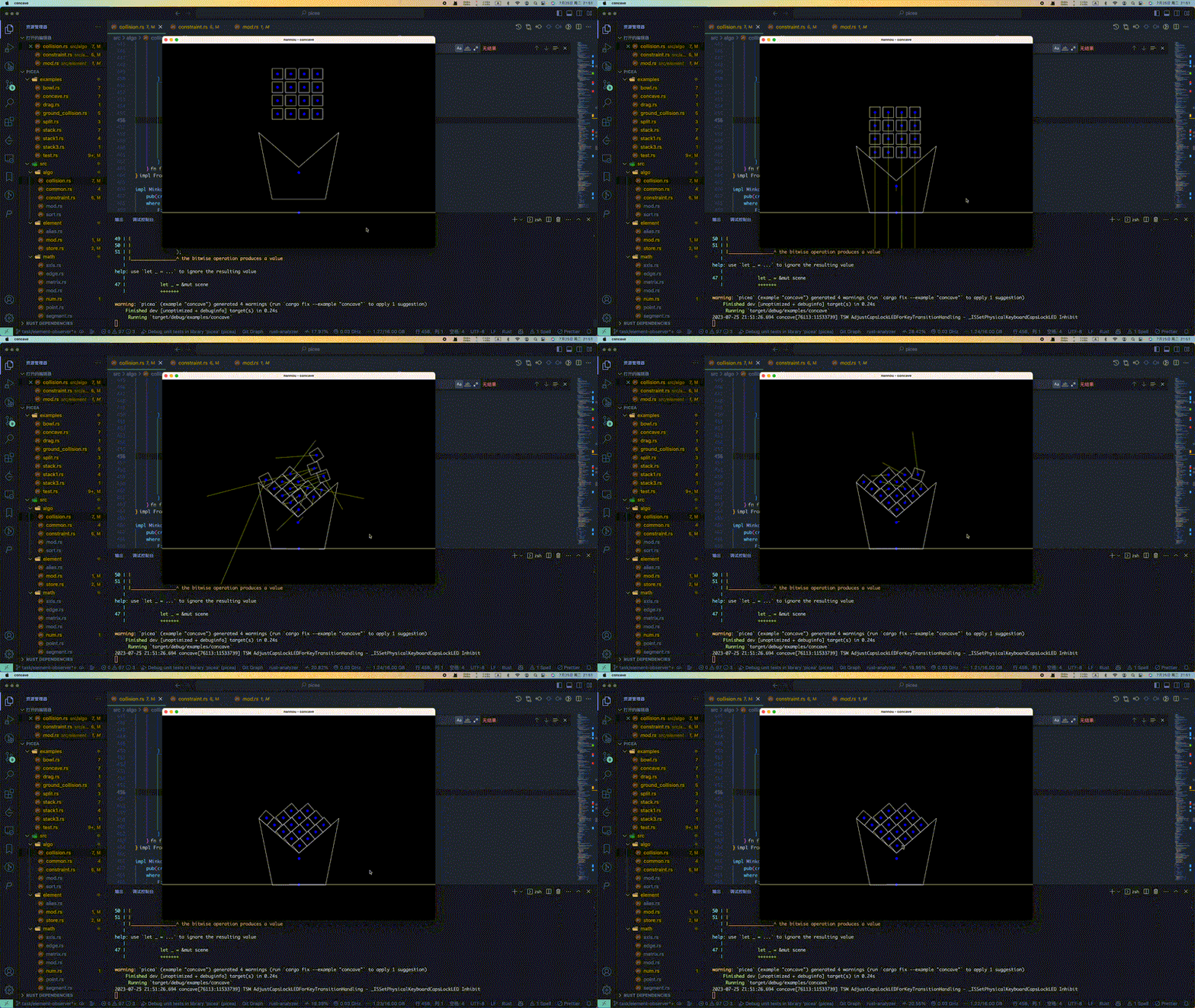
现在系统就很稳定了

· 3 min read
Swnb

3 个使用 @swnb/event 的理由

github

1. 简化 web 事件监听模型

react 里面, 有时候你不得不这么写来处理监听事件

example.tsx

_10
useEffect(() => {
_10
const callback = () => {}
_10
_10
target.addEventListner("event", callback)
_10
_10
return () => {
_10
target.removeEvenListner("event", callback)
_10
}
_10
}, [target])

如果你想要处理多个事件

example.tsx

_15
useEffect(() => {
_15
const callback1 = () => {}
_15
target.addEventListner("event1", callback1)
_15
_15
const callback2 = () => {}
_15
target.addEventListner("event2", callback2)
_15
_15
// ....
_15
_15
return () => {
_15
target.removeEvenListner("event1", callback1)
_15
target.removeEvenListner("event2", callback2)
_15
// ....
_15
}
_15
}, [target])

这太难受了

如果你使用 @swnb/event

example.tsx

_10
import { EventProxy } from "@swnb/event"
_10
useEffect(
_10
() =>
_10
EventProxy.new(target)
_10
.on("event1", (...args) => {}) // 支持类型提示 !!!
_10
.on("event2", (...args) => {}) // 支持类型提示 !!!
_10
.on("event3", (...args) => {}), // 支持类型提示 !!!
_10
[target]
_10
)

编程从来没有这么简单过

2. Promise support

考虑一个场景, 你要建立一个 websocket 连接, 并等待连接打开, 并设置最大连接时长, 考虑正确的释放资源, 你可能会写如下的代码

websocket.ts

_18
async function connect(url: string, timeout: number) {
_18
const ws = new WebSocket(url)
_18
_18
return new Promise<WebSocket>((res, rej) => {
_18
const timeID = setTimeout(() => {
_18
rej(new Error("timeout"))
_18
ws.removeEventListener("open", onOpen)
_18
}, timeout)
_18
_18
function onOpen() {
_18
res(ws)
_18
clearTimeout(timeID)
_18
ws.removeEventListener("open", onOpen)
_18
}
_18
_18
ws.addEventListener("open", onOpen)
_18
})
_18
}

实在是太烦人了

如果你使用 @swnb/event

websocket.ts

_10
import { EventProxy } from "@swnb/event"
_10
_10
async function connect(url: string, timeout: number) {
_10
const ws = new WebSocket(url)
_10
_10
await EventProxy.new(ws).waitUtil("open", { timeout }) // 支持类型提示 !
_10
_10
return ws
_10
}

编程从来没有这么简单过

考虑一个更加复杂的场景, 创建一个 webrtc 连接, 等待连接 connected

rtc.ts

_12
import { EventProxy } from "@swnb/event"
_12
_12
async function connect(timeout: number) {
_12
const connection = new RTCPeerConnection()
_12
_12
await EventProxy.new(connection).waitUtil("connectionstatechange", {
_12
timeout,
_12
where: (ev) => connection.connectionState === "connected",
_12
})
_12
_12
return connection
_12
}

使用 where 可以选择你想要的那个 connectionState

3. 观察一个 web 对象的所有事件

如果你想知道 video 在播放的时候触发了哪些事件, 可以考虑这么写

video.ts

_10
import { EventProxy } from "@swnb/event"
_10
// 支持类型提示 !
_10
EventProxy.new(videoDom, { proxyAllEvent: true }).any((eventName, ...args) => {
_10
console.log(eventName)
_10
})

放在 react 里面可以这么写

video.tsx

_15
import { EventProxy } from "@swnb/event"
_15
import { useEffect, useRef } from "react"
_15
_15
function Video() {
_15
const videoDomRef = useRef<HTMLVideoElement>(null)
_15
useEffect(() => {
_15
return EventProxy.new(videoDomRef.current!, { proxyAllEvent: true }).any((eventName, ...args) => {
_15
console.log(eventName)
_15
})
_15
}, [])
_15
_15
const url = "" // 你的 video 链接
_15
_15
return <video muted autoPlay src={url} ref={videoDomRef} />
_15
}

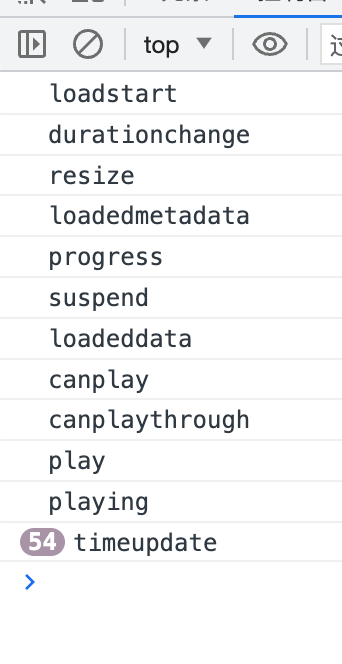
打开控制台, 你会看到所有 video 的事件触发顺序和时间

编程从来没有这么简单过

· 9 min read
Swnb

tsconfig.json 的配置很多,大致内容如下

tsconfig.json

_109
{
_109
"compilerOptions": {
_109
/* Visit https://aka.ms/tsconfig to read more about this file */
_109
_109
/* Projects */
_109
// "incremental": true, /* Save .tsbuildinfo files to allow for incremental compilation of projects. */
_109
// "composite": true, /* Enable constraints that allow a TypeScript project to be used with project references. */
_109
// "tsBuildInfoFile": "./.tsbuildinfo", /* Specify the path to .tsbuildinfo incremental compilation file. */
_109
// "disableSourceOfProjectReferenceRedirect": true, /* Disable preferring source files instead of declaration files when referencing composite projects. */
_109
// "disableSolutionSearching": true, /* Opt a project out of multi-project reference checking when editing. */
_109
// "disableReferencedProjectLoad": true, /* Reduce the number of projects loaded automatically by TypeScript. */
_109
_109
/* Language and Environment */
_109
"target": "es2016" /* Set the JavaScript language version for emitted JavaScript and include compatible library declarations. */,
_109
// "lib": [], /* Specify a set of bundled library declaration files that describe the target runtime environment. */
_109
// "jsx": "preserve", /* Specify what JSX code is generated. */
_109
// "experimentalDecorators": true, /* Enable experimental support for legacy experimental decorators. */
_109
// "emitDecoratorMetadata": true, /* Emit design-type metadata for decorated declarations in source files. */
_109
// "jsxFactory": "", /* Specify the JSX factory function used when targeting React JSX emit, e.g. 'React.createElement' or 'h'. */
_109
// "jsxFragmentFactory": "", /* Specify the JSX Fragment reference used for fragments when targeting React JSX emit e.g. 'React.Fragment' or 'Fragment'. */
_109
// "jsxImportSource": "", /* Specify module specifier used to import the JSX factory functions when using 'jsx: react-jsx*'. */
_109
// "reactNamespace": "", /* Specify the object invoked for 'createElement'. This only applies when targeting 'react' JSX emit. */
_109
// "noLib": true, /* Disable including any library files, including the default lib.d.ts. */
_109
// "useDefineForClassFields": true, /* Emit ECMAScript-standard-compliant class fields. */
_109
// "moduleDetection": "auto", /* Control what method is used to detect module-format JS files. */
_109
_109
/* Modules */
_109
"module": "commonjs" /* Specify what module code is generated. */,
_109
// "rootDir": "./", /* Specify the root folder within your source files. */
_109
// "moduleResolution": "node10", /* Specify how TypeScript looks up a file from a given module specifier. */
_109
// "baseUrl": "./", /* Specify the base directory to resolve non-relative module names. */
_109
// "paths": {}, /* Specify a set of entries that re-map imports to additional lookup locations. */
_109
// "rootDirs": [], /* Allow multiple folders to be treated as one when resolving modules. */
_109
// "typeRoots": [], /* Specify multiple folders that act like './node_modules/@types'. */
_109
// "types": [], /* Specify type package names to be included without being referenced in a source file. */
_109
// "allowUmdGlobalAccess": true, /* Allow accessing UMD globals from modules. */
_109
// "moduleSuffixes": [], /* List of file name suffixes to search when resolving a module. */
_109
// "allowImportingTsExtensions": true, /* Allow imports to include TypeScript file extensions. Requires '--moduleResolution bundler' and either '--noEmit' or '--emitDeclarationOnly' to be set. */
_109
// "resolvePackageJsonExports": true, /* Use the package.json 'exports' field when resolving package imports. */
_109
// "resolvePackageJsonImports": true, /* Use the package.json 'imports' field when resolving imports. */
_109
// "customConditions": [], /* Conditions to set in addition to the resolver-specific defaults when resolving imports. */
_109
// "resolveJsonModule": true, /* Enable importing .json files. */
_109
// "allowArbitraryExtensions": true, /* Enable importing files with any extension, provided a declaration file is present. */
_109
// "noResolve": true, /* Disallow 'import's, 'require's or '<reference>'s from expanding the number of files TypeScript should add to a project. */
_109
_109
/* JavaScript Support */
_109
// "allowJs": true, /* Allow JavaScript files to be a part of your program. Use the 'checkJS' option to get errors from these files. */
_109
// "checkJs": true, /* Enable error reporting in type-checked JavaScript files. */
_109
// "maxNodeModuleJsDepth": 1, /* Specify the maximum folder depth used for checking JavaScript files from 'node_modules'. Only applicable with 'allowJs'. */
_109
_109
/* Emit */
_109
// "declaration": true, /* Generate .d.ts files from TypeScript and JavaScript files in your project. */
_109
// "declarationMap": true, /* Create sourcemaps for d.ts files. */
_109
// "emitDeclarationOnly": true, /* Only output d.ts files and not JavaScript files. */
_109
// "sourceMap": true, /* Create source map files for emitted JavaScript files. */
_109
// "inlineSourceMap": true, /* Include sourcemap files inside the emitted JavaScript. */
_109
// "outFile": "./", /* Specify a file that bundles all outputs into one JavaScript file. If 'declaration' is true, also designates a file that bundles all .d.ts output. */
_109
// "outDir": "./", /* Specify an output folder for all emitted files. */
_109
// "removeComments": true, /* Disable emitting comments. */
_109
// "noEmit": true, /* Disable emitting files from a compilation. */
_109
// "importHelpers": true, /* Allow importing helper functions from tslib once per project, instead of including them per-file. */
_109
// "importsNotUsedAsValues": "remove", /* Specify emit/checking behavior for imports that are only used for types. */
_109
// "downlevelIteration": true, /* Emit more compliant, but verbose and less performant JavaScript for iteration. */
_109
// "sourceRoot": "", /* Specify the root path for debuggers to find the reference source code. */
_109
// "mapRoot": "", /* Specify the location where debugger should locate map files instead of generated locations. */
_109
// "inlineSources": true, /* Include source code in the sourcemaps inside the emitted JavaScript. */
_109
// "emitBOM": true, /* Emit a UTF-8 Byte Order Mark (BOM) in the beginning of output files. */
_109
// "newLine": "crlf", /* Set the newline character for emitting files. */
_109
// "stripInternal": true, /* Disable emitting declarations that have '@internal' in their JSDoc comments. */
_109
// "noEmitHelpers": true, /* Disable generating custom helper functions like '__extends' in compiled output. */
_109
// "noEmitOnError": true, /* Disable emitting files if any type checking errors are reported. */
_109
// "preserveConstEnums": true, /* Disable erasing 'const enum' declarations in generated code. */
_109
// "declarationDir": "./", /* Specify the output directory for generated declaration files. */
_109
// "preserveValueImports": true, /* Preserve unused imported values in the JavaScript output that would otherwise be removed. */
_109
_109
/* Interop Constraints */
_109
// "isolatedModules": true, /* Ensure that each file can be safely transpiled without relying on other imports. */
_109
// "verbatimModuleSyntax": true, /* Do not transform or elide any imports or exports not marked as type-only, ensuring they are written in the output file's format based on the 'module' setting. */
_109
// "allowSyntheticDefaultImports": true, /* Allow 'import x from y' when a module doesn't have a default export. */
_109
"esModuleInterop": true /* Emit additional JavaScript to ease support for importing CommonJS modules. This enables 'allowSyntheticDefaultImports' for type compatibility. */,
_109
// "preserveSymlinks": true, /* Disable resolving symlinks to their realpath. This correlates to the same flag in node. */
_109
"forceConsistentCasingInFileNames": true /* Ensure that casing is correct in imports. */,
_109
_109
/* Type Checking */
_109
"strict": true /* Enable all strict type-checking options. */,
_109
// "noImplicitAny": true, /* Enable error reporting for expressions and declarations with an implied 'any' type. */
_109
// "strictNullChecks": true, /* When type checking, take into account 'null' and 'undefined'. */
_109
// "strictFunctionTypes": true, /* When assigning functions, check to ensure parameters and the return values are subtype-compatible. */
_109
// "strictBindCallApply": true, /* Check that the arguments for 'bind', 'call', and 'apply' methods match the original function. */
_109
// "strictPropertyInitialization": true, /* Check for class properties that are declared but not set in the constructor. */
_109
// "noImplicitThis": true, /* Enable error reporting when 'this' is given the type 'any'. */
_109
// "useUnknownInCatchVariables": true, /* Default catch clause variables as 'unknown' instead of 'any'. */
_109
// "alwaysStrict": true, /* Ensure 'use strict' is always emitted. */
_109
// "noUnusedLocals": true, /* Enable error reporting when local variables aren't read. */
_109
// "noUnusedParameters": true, /* Raise an error when a function parameter isn't read. */
_109
// "exactOptionalPropertyTypes": true, /* Interpret optional property types as written, rather than adding 'undefined'. */
_109
// "noImplicitReturns": true, /* Enable error reporting for codepaths that do not explicitly return in a function. */
_109
// "noFallthroughCasesInSwitch": true, /* Enable error reporting for fallthrough cases in switch statements. */
_109
// "noUncheckedIndexedAccess": true, /* Add 'undefined' to a type when accessed using an index. */
_109
// "noImplicitOverride": true, /* Ensure overriding members in derived classes are marked with an override modifier. */
_109
// "noPropertyAccessFromIndexSignature": true, /* Enforces using indexed accessors for keys declared using an indexed type. */
_109
// "allowUnusedLabels": true, /* Disable error reporting for unused labels. */
_109
// "allowUnreachableCode": true, /* Disable error reporting for unreachable code. */
_109
_109
/* Completeness */
_109
// "skipDefaultLibCheck": true, /* Skip type checking .d.ts files that are included with TypeScript. */
_109
"skipLibCheck": true /* Skip type checking all .d.ts files. */
_109
}
_109
}

大致说一下一些难以理解的配置项

esModuleInterop

example.ts

_10
import fsDefault from "fs"
_10
import * as fsNamespace from "fs"

通常来说 fsDefault 和 fsNamespace 是不同的,如果你打开了 esModuleInterop, 那么 fsDefaultfsNamespace 就是相同的,如果你碰到 import fs from 'fs' 报错的情况 那么应该是改配置没有打开的原因

noEmit

该配置会导致 tsc 不输出任何文件,一般当你需要用 tsc 只做类型检查,不生成代码的时候,你可以考虑打开该配置

include , files rootDir and outDir

如果使用 files 指定所有 ts 文件是很麻烦的

直接使用 "include":["src"] 可以涵盖该目录的所有文件

rootDir 指定输出代码所在的目录树的顶部 The compilerOptions.rootDir option defines the root of the tree at outDir , 默认如果文件在 rootDir 不在 include 会有一些错误提示

moduleResolution

查找文件的方式,建议就是 node, 规定了 import 查找文件的方式

paths

pathsbaseUrl 指定了在 import 的时候时候如何查找文件,但是它不负责帮你转换成相对路径,所以如果你在使用 tsc ,并将它用于库的时候,请使用 tsc-alias 或者禁用 baseUrl 属性

tsconfig.json

_10
{
_10
"baseUrl": ".", // baseUrl不可少
_10
"paths": {
_10
// 映射列表
_10
"@/*": ["src/*"],
_10
"moduleA": ["src/libs/moduleA"]
_10
}
_10
}

· 3 min read
Swnb

看看下面的代码输出什么

example.ts

_10
requestAnimationFrame(() => {
_10
console.log(1)
_10
})
_10
_10
setTimeout(() => {
_10
console.log(2)
_10
})

如果你把上面的代码复制到浏览器的控制台, 输出结果应该是2 1 , 为什么?

按照常规的宏任务和渲染的理解, requestAnimationFrame 和 setTimeout 都是宏任务, 浏览器的执行顺序是 requestAnimationFrame -> 渲染(render) -> setTimeout, 输出的结果应该是 1 2 才对

这就要说到一个重点, 那就是宏任务和宏任务之间不一定会发生渲染, 浏览器会判断是否需要渲染, 即便是你在前一个宏任务里面更改了 dom 元素的属性, 也不一定会在下一个宏任务触发前发生渲染, 而 requestAnimationFrame 一定是伴随着渲染而触发的, 没有渲染就不会触发 requestAnimationFrame

浏览器真实的执行顺序是 宏任务 -> 微任务队列清空 -> 判断是否执行渲染 -> 需要渲染 ? requestAnimationFrame 宏任务触发 + 微任务队列清空 + 渲染

通过下面的例子,能更直观的理解这个过程


右边的示例, 每次点击 div 元素的时候, 都会调用 requestAnimationFramesetTimeout

多次点击 div 后, 你会发现大部分的输出的都是 2 1

加上一段代码, 每次点击都会更新 dom 的宽度, 你会发现输出大部分都是 1 2,只有少部分的 2 1 这是因为浏览器要发生频繁的渲染, 伴随着 requestAnimationFrame 的触发比 setTimeout 更加快, 但是浏览器仍然会跳过一些渲染

example.html

_19
<body>
_19
<div
_19
id="root"
_19
style="background-color: yellowgreen; width: 500px; height: 200px;"
_19
></div>
_19
<script>
_19
const div = document.querySelector("#root")
_19
_19
div.addEventListener("click", () => {
_19
requestAnimationFrame(() => {
_19
console.log(1)
_19
})
_19
_19
setTimeout(() => {
_19
console.log(2)
_19
})
_19
})
_19
</script>
_19
</body>

· 4 min read
Swnb

管理员权限(windows)

如果有修改用户注册表的需求, 需要获取管理员权限, 可以在 electron-builder 里面设置

electron-builder.yml

_10
win:
_10
requestedExecutionLevel: requireAdministrator

程序在启动的时候就会请求管理员权限

媒体权限

如果要获取摄像头和麦克风的权限, 首先要创建一个 plist , plist 里面可以指定以下的权限 plist
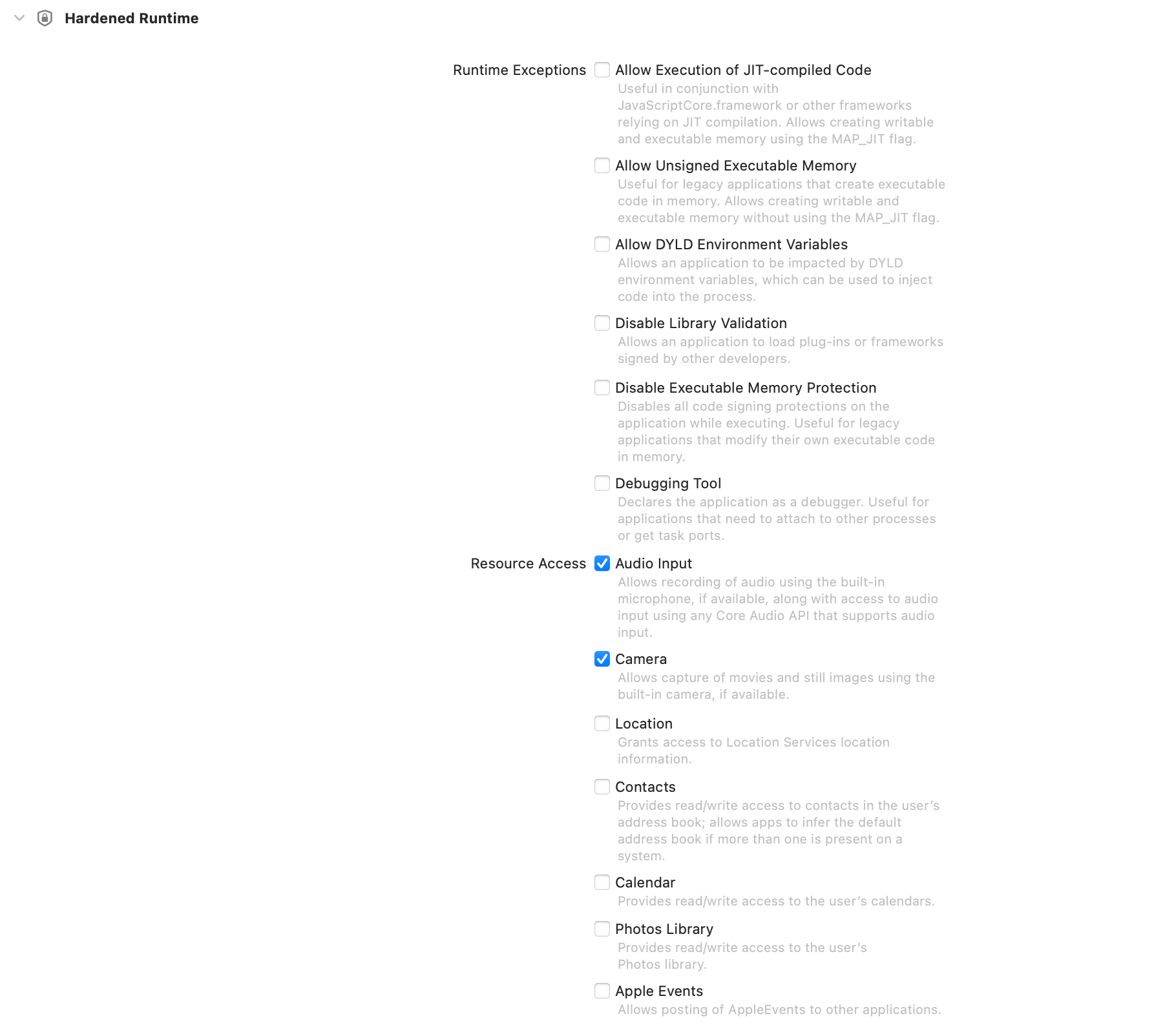
plist 如下所示

entitlements.mac.plist

_16
<?xml version="1.0" encoding="UTF-8"?>
_16
<!DOCTYPE plist PUBLIC "-//Apple//DTD PLIST 1.0//EN" "http://www.apple.com/DTDs/PropertyList-1.0.dtd">
_16
<plist version="1.0">
_16
<dict>
_16
<key>com.apple.security.cs.allow-jit</key>
_16
<true/>
_16
<key>com.apple.security.cs.allow-unsigned-executable-memory</key>
_16
<true/>
_16
<key>com.apple.security.cs.allow-dyld-environment-variables</key>
_16
<true/>
_16
<key>com.apple.security.device.audio-input</key>
_16
<true/>
_16
<key>com.apple.security.device.camera</key>
_16
<true/>
_16
</dict>
_16
</plist>

💡提示

plist 必须完整, 如果你删掉了一些内容, 那么应用会崩溃😭

然后配置 electron-builder

配置 plist

加上请求权限的提示

屏幕录制的提示

electron-builder.yml

_10
mac:
_10
hardenedRuntime: true # 启用 hardenedRuntime
_10
entitlements: entitlements.mac.plist # plist 文件路径

辅助功能

如果你的 electron 需要调用一些 .node 文件去做操作,比如锁屏,那就要在 plist 里面指定 disable-library-validation

entitlements.mac.plist

_18
<?xml version="1.0" encoding="UTF-8"?>
_18
<!DOCTYPE plist PUBLIC "-//Apple//DTD PLIST 1.0//EN" "http://www.apple.com/DTDs/PropertyList-1.0.dtd">
_18
<plist version="1.0">
_18
<dict>
_18
<key>com.apple.security.cs.allow-jit</key>
_18
<true/>
_18
<key>com.apple.security.cs.allow-unsigned-executable-memory</key>
_18
<true/>
_18
<key>com.apple.security.cs.allow-dyld-environment-variables</key>
_18
<true/>
_18
<key>com.apple.security.device.audio-input</key>
_18
<true/>
_18
<key>com.apple.security.device.camera</key>
_18
<true/>
_18
<key>com.apple.security.cs.disable-library-validation</key>
_18
<true/>
_18
</dict>
_18
</plist>

在应用中请求并确认权限

查看是否有 摄像头 权限,第一次会弹出询问框

查看是否有 麦克风 权限,第一次会弹出询问框

查看是否有 屏幕录制 权限

查看是否有 辅助功能 权限

main.tsx

_10
const isCameraAccessGranted = await systemPreferences.askForMediaAccess(
_10
"camera"
_10
)

可以根据上面的权限状态弹出提示框来提示用户打开权限

· 8 min read
Swnb

起因

最近在用 electron 开发一个线上的考试应用,有一个需求是在监考模式下拦截 用户的键盘事件,防止用户锁屏或者使用其它快捷键切换应用,在 github 翻了一圈,没有找到合适的方案 o(╥﹏╥)o,所以用 rust 写了一个 lib,然后用 napi-rs 打包成 nodejs 库。下面记录下整个流程。

mac os

开发 mac os 应用,需要使用 cocoa 库,mozilla 开发了一个 rust 版本的库core-foundation-rs

使用 core_graphicsCGEventTap 可以拦截键盘事件


_16
use core_graphics::event::{
_16
CGEventTap, CGEventTapLocation, CGEventTapOptions, CGEventTapPlacement, CGEventType::KeyDown,
_16
};
_16
_16
fn handle_key_event() {
_16
let cg_event_tap = CGEventTap::new(
_16
CGEventTapLocation::Session,
_16
// 插入队首
_16
CGEventTapPlacement::HeadInsertEventTap,
_16
// 默认行为过滤
_16
CGEventTapOptions::Default,
_16
// 监听的事件
_16
vec![CGEventType::KeyDown],
_16
callback,
_16
);
_16
}

构造 CGEventTap 的 5 参数依次表示

  1. 监听事件的区域 直接选 CGEventTapLocation::Session 即可
  2. 插入队首还是队尾,当一个事件触发的时候,会依次调用回掉队列上面的回调函数,前面的回调函数可以阻止后面的回调函数触发,这里插入队首部,阻止后面的默认系统行为触发
  3. 只监听事件的触发还是可以阻止后面的行为触发 这里选择 Default
  4. 监听的事件,当前只监听键盘 KeyDown 事件
  5. 回调函数 callback

callback 接受 3 个参数,分别是 CGEventTapProxy, CGEventType, CGEvent

添加 callback 函数

callback 函数可以

判断 event 类型

event 类型需要通过判断当前的 CGEventType 是否

获取 keycode

通过 get_integer_value_field 拿到 keycode

判断是否是 meta 键

通过 event.get_flags() 判断 CGEventFlags

禁用某个键

设置 key event 为 NULL , 禁用这个键,比如禁用 control

lib.rs

_19
_19
use core_graphics::event::{
_19
CGEvent, CGEventTap, CGEventTapLocation, CGEventTapOptions, CGEventTapPlacement, CGEventType::KeyDown,
_19
};
_19
_19
fn handle_key_event() {
_19
let cg_event_tap = CGEventTap::new(
_19
CGEventTapLocation::Session,
_19
// 插入队首
_19
CGEventTapPlacement::HeadInsertEventTap,
_19
// 默认行为过滤
_19
CGEventTapOptions::Default,
_19
// 监听的事件
_19
vec![CGEventType::KeyDown],
_19
|proxy: *const std::ffi::c_void, event_type: CGEventType, event: &CGEvent|{
_19
Some(event.clone())
_19
},
_19
);
_19
}

上面的代码,还要加入事件循环中才能生效


_19
use core_foundation::runloop::{kCFRunLoopCommonModes, CFRunLoop};
_19
_19
let current: CFRunLoop = CFRunLoop::get_current();
_19
_19
match cg_event_tap {
_19
Ok(tap) => unsafe {
_19
let loop_source = tap
_19
.mach_port
_19
.create_runloop_source(0)
_19
.expect("sames broken");
_19
_19
current.add_source(&loop_source, kCFRunLoopCommonModes.clone());
_19
_19
tap.enable();
_19
_19
CFRunLoop::run_current();
_19
},
_19
Err(_) => panic!("can't prevent key event"),
_19
}

最终得到在 mac os 下的代码如下所示

💡辅助功能

在 mac os 需要在隐私和安全性里面打开对应程序的辅助功能,该程序才能生效


_51
use core_foundation::runloop::{kCFRunLoopCommonModes, CFRunLoop};
_51
use core_graphics::event::{
_51
CGEvent, CGEventTap, CGEventTapLocation, CGEventTapOptions, CGEventTapPlacement, CGEventType,EventField,CGEventFlags,
_51
};
_51
_51
fn handle_key_event() {
_51
let cg_event_tap = CGEventTap::new(
_51
CGEventTapLocation::Session,
_51
// 插入队首
_51
CGEventTapPlacement::HeadInsertEventTap,
_51
// 默认行为过滤
_51
CGEventTapOptions::Default,
_51
// 监听的事件
_51
vec![CGEventType::KeyDown],
_51
|proxy: *const std::ffi::c_void, event_type: CGEventType, event: &CGEvent| match event_type {
_51
CGEventType::KeyDown => {
_51
let key = event.get_integer_value_field(EventField::KEYBOARD_EVENT_KEYCODE);
_51
_51
// 判断 control 键是否摁下
_51
let is_control_press =
_51
CGEventFlags::CGEventFlagControl & event.get_flags() == CGEventFlags::CGEventFlagControl;
_51
_51
if is_control_press {
_51
// 禁用这个快捷键
_51
event.set_type(CGEventType::Null);
_51
}
_51
_51
Some(event.clone())
_51
}
_51
_ => Some(event.clone()),
_51
},
_51
);
_51
_51
let current: CFRunLoop = CFRunLoop::get_current();
_51
_51
match cg_event_tap {
_51
Ok(tap) => unsafe {
_51
let loop_source = tap
_51
.mach_port
_51
.create_runloop_source(0)
_51
.expect("sames broken");
_51
_51
current.add_source(&loop_source, kCFRunLoopCommonModes.clone());
_51
_51
tap.enable();
_51
_51
CFRunLoop::run_current();
_51
},
_51
Err(_) => panic!("can't prevent key event"),
_51
}
_51
}

windows

windows 下面实现锁屏的功能实在有点复杂,除了写键盘的事件 hook , 还要修改用户的注册表

这里使用了一个第三方库rdev来实现,rdev本质上还是调用了 windows api SetWindowsHookExA 来实现的

微软官方维护了一个 windows-rs 的 crate,也可以通过它来实现相应的功能

具体使用 rdev grab 的代码就不再详细说了


_10
rdev::grab(move |ev| match ev.event_type {
_10
EventType::KeyPress(key) => {
_10
if should_restrict(key) {
_10
None
_10
} else {
_10
Some(ev)
_10
}
_10
}
_10
_ => Some(ev),
_10
});

rdev 可以拦截绝大部分 windows 的按键,但是有一些键很特殊,是不能通过写 hook 来拦截的,比如这三个键

  1. win + l 锁屏
  2. win + g 弹出 windows game
  3. ctrl + alt + delete CAD

上面三个键只能通过修改用户的注册表来实现拦截

💡管理员权限

修改注册表需要 windows 的管理员权限,必须要请求管理员权限

win + l 的注册表位于 HKEY_CURRENT_USER\Software\Microsoft\Windows\CurrentVersion\Policies\SystemDisableLockWorkstation 改为 1 即可禁用锁屏

win + g 位于 HKEY_CURRENT_USER\SOFTWARE\Microsoft\Windows\CurrentVersion\GameDVRAppCaptureEnabled 设置成 0 即可禁止

cad 位于 HKEY_LOCAL_MACHINE\SOFTWARE\Microsoft\Windows NT\CurrentVersion\Image File Execution Options\taskmgr.exeDebugger 设置成 Hotkey Disabled 即可禁止

如果是在 electron 里面直接使用 nodejs 的库 regedit 即可,使用 regedit 禁用 win + l 示例如下


_24
// 禁用 win + l 锁屏
_24
import regeditOrigin from "regedit"
_24
_24
const regedit = regeditOrigin.promisified
_24
_24
async function main() {
_24
const winLRegisterPath =
_24
"HKCU\\Software\\Microsoft\\Windows\\CurrentVersion\\Policies\\System"
_24
_24
try {
_24
await regedit.createKey([winLRegisterPath])
_24
} catch (error) {
_24
console.error(error)
_24
}
_24
_24
await regedit.putValue({
_24
[winLRegisterPath]: {
_24
DisableLockWorkstation: {
_24
type: "REG_DWORD",
_24
value: 1,
_24
},
_24
},
_24
})
_24
}

💡注意

regedit 在调用的时候需要将 HKEY_CURRENT_USER 需要改成 HKCU

如法炮制即可禁用剩余的 win 快捷键,使用 napi-rs 打包, 用 github actions 编译成 .node 文件, 便可在 electron 中使用实现 霸屏 的功能

真不好搞 😭